Friday, November 20, 2015

Doing 1 thing each day using Powershell

While at Ignite on the Gold Coast this week, it became very obvious to me that there are some really key technologies that I need to be across.  Watching people develop code and seeing them zip around using the Command line and various package managers highlighted where things are at with the developer workflow.

Technologies that I have committed to being across are:
  • Yeoman
  • Powershell
  • Git
  • Grunt/Gulp
  • Chocolatey
  • Visual Studio Team Services
To ensure that I remain curious and stay on track, I'm going to try and do one thing with Powershell each day.  Today's task is…

Delete project.lock.json files from a solution
This was a bigger issue in the past than it seems to be now, but I found that I regularly needed to manually delete the DNX lock files that were being generated by dnu.

The final product:

gci "\repos\dneimke\EF7Demo.CoffeeStore\*" -include "project.lock.json" -recurse | foreach($​_) {rm $ _​.fullname}

What I Learned:
  • The Get-Help cmdlet is a great resource for learning about how other cmdlets work
  • Get-Alias lists the aliases for all cmdlets
  • Get-ChildItem takes a -Path which makes it easy to list items in a folder - e.g. Get-ChildItem -Path \repos\test
  • Include seems to be the better way to target a specific pattern of file rather than -Filter

Resources:

Wednesday, November 18, 2015

Getting Started with EF7 - Adding EF7 to a new Project

While on the Gold Coast at Ignite, I presented on the new version of Entity Framework (EF7) while my colleague Jon spoke about the broader topic of .NET vNext.

In my talk, I gave 4 demos:
  1. Walkthrough showing how to add EF7 to a new project
  2. Using SQL Profiler to show the queries that EF7 generates for various scenarios
  3. Adding Migrations and Seeding to your application
  4. Using the new InMemoryProvider to easily unit test code that depends on EF7 data contexts
For the first demo I really wanted to show how simple it is to get started with EF7 and how the new component architecture works with respect to Nuget packaging.

For my first demo, I started off by creating a new Console Application (Package) project from the Web Templates.


The Solution must be configured so that the runtime version is aligned with a runtime that you have installed and Nuget is knows which Package Source contains the versions of the dependencies that you want to use.

To find which runtime versions you are installed on your machine, use the DNVM list command:


This shows that my machine is currently configured to use the 1.0.0-rc2-16183 clr x64 runtime, so the first thing I do is to change the global.json solution file to match.

{
  "projects": [ "src", "test" ],
  "sdk": {
    "version": "1.0.0-rc2-16183"
  }
}

Nuget needs to know where to look when it restores packages.  This can be done by adding it in the Nuget.Config file.

In this case the ASPNETCIDev source which is hosted on MyGet is where I want to get the EF packages from as contains the most recent packages from the ASPNET daily CI build process.

<?xml version="1.0" encoding="utf-8"?>
<configuration>
  <packageSources>
    <clear />
    <add key="api.nuget.org" value="https://api.nuget.org/v3/index.json" />
    <add key="aspnetcidev" value="https://www.myget.org/F/aspnetcidev/api/v3/index.json" />
  
</configuration>

The last thing to do is to add references for the EF7 dependencies that I need. I this case I'm after the following 3 packages:

  1. EntityFramework.Core: Contains core logic for DbSets, DbContexts, DataAnnotations, Querying, ChangeTracking, and Configuration among other things. 
  2. EntityFramework.Commands: A set of commands that can be used to create Migrations, Update Databases, and to scaffold an application from an existing database.
  3. EntityFramework.MicrosoftSqlServer: A database provider for using EF against a Microsoft SQL Server database.

Each of these packages represent a single project in the EntityFramework repository which is available to view in this GitHub repository.

"dependencies": {
  "EntityFramework.Core": "7.0.0-*",
  "EntityFramework.Commands": "7.0.0-*",
  "EntityFramework.MicrosoftSqlServer": "7.0.0-*"
},
 
"commands": {
  "ConsoleApp10": "ConsoleApp10",
  "ef": "EntityFramework.Commands"
},

The "ef" command which is added to the project commands can be used to run the EF commands using DNX.

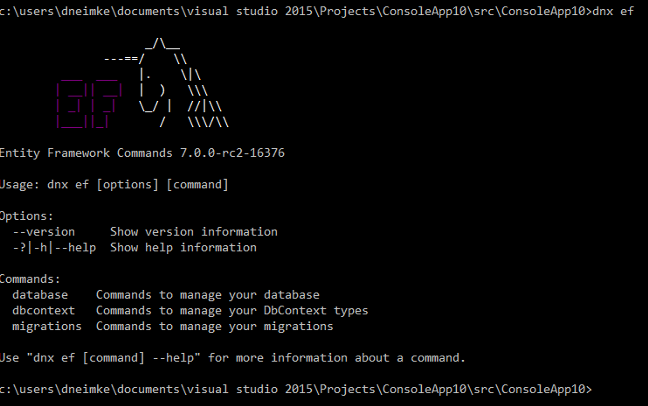
At this point, EF7 is configured and available to use. To test this, jump to the command line at the root of your project and type dnx ef. You should see the Magic Unicorn splash screen.


I finished the demo by creating a simple DbContext which contained a  couple of DbSet entities and created a Migration  using the EntityFramework Commands so that I could start working against a database.

What I hoped to achieve through this demo was to show the configuration points and how they connect the application to its environment and dependencies.

It is important to take note of the benefits that are achieved from the EF7 'ground up' rewrite which has delivered multiple, lightweight packages which empowers application developers to take only what they need in terms of dependencies.  Don't need Commands?  Simple, don't take that dependency!  Over time, this will enable more rapid innovation from Microsoft's end and increase flexibility and performance on the applications side.

If you are interested in taking a look at the sample code from my demos, you can find it in this GitHub repository.


Sunday, July 14, 2013

Problem trying to run a Web Application using Visual Studio 2013 Preview


I'm putting this here in the hope of saving some other poor soul the hour I lost this afternoon while playing around with a fresh Visual Studio 2013 Preview installation (Visual Studio Version 12).

I created a new Web Application (MVC Template) and pressed F5 to start it in debug mode.

Launch a new web application from within Visual Studio
 I was immediately presented with the following error dialog from within Visual Studio.

Microsoft Visual Studio.  
Process with an Id of xxxx is not running. 


I also saw the following text in my debug console window: The program '[xxxx] iisexpress.exe' has exited with code 0 (0x0)

The problem turned out to be an incorrect configuration for an IIS Express application pool setting which I found in my \users{your username}\mydocuments\IISexpress\config applicationhost.config configuration file.

The managedRuntimeVersion was mis-configured by default
I needed to change the framework version for the default app pool to match the current framework version that is installed for .NET 4.  In my case, that meant changing the version to v4.0.30319.


Thursday, September 13, 2012

How to Use Google Plus Circles

A common question I hear is "How can I get value from Circles in Google+" so I thought I'd list a few ways that I find them helpful.   Firstly here's an image that shows what my Circle strategy looks like:


As you can see, I don't have hundreds of Circles - although I wouldn't necessarily be opposed to having that many either.  Here are my top 5 reasons for using Circles:

Privacy
An obvious initial reason for segregating users into Circles is to limit the scope of information that you share.  Again, this is a key driver behind my [Colleagues] and [Family] Circles.  Having the ability to post information directly to those groups allows me to limit information from being seen by people that it might not be relevant for.  

Example: I'm at the beach and I use my mobile phone to take some photos.  When I get home, the photos are instantly sync'd with my G+ account as soon as my phone hits the Wifi.  From there it's just a couple of clicks to share those photos with my family members by posting them to the [Family] Circle.

Noise filtering
I know how frustrated I feel when I see other people clogging up my feed with their own personal interests (e.g. excessive posts about cats) and so, I believe that it is really important to be aware of and manage to the amount of "noise" that I emit to other individuals.  

Example: I'm confident my [Hockey] friends don't mind me posting several updates a day about hockey related stuff (e.g. pictures, embedded YouTube video's, etc.).  However add that up with my [Developer Community] related posts, and a few other general posts and suddenly I'm at risk of having people de-circle me because I'm too noisy.  

Having a [Hockey] circle allows me to post hockey-specific stuff to just those members and thus reduces the amount of "noise" that I'm sending to people with no interest in hockey whatsoever.

Tip: A neat feature is [Your Circles].  [Your Circles] is one step back from [Public] and allows you to easily share information with the widest scoped audience.  In Settings you can manage how wide that scope is by managing which Circles are included in the [Your Circles] scope:


Scanning
The Internet provides us with unlimited opportunities to access information, but managing the signal to noise level is a constant challenge.  [News and Information] and [Tech News] are Circles where I've add lots of providers and therefore receive a great deal of information.  To deal with the resultant "noise", I then tune the volume of information I receive from them in my main feed by using the following tools.  

Tune the amount of information displayed in the main feed

Click on filters to display all items for a given Circle

Drag Circles to change their order so that most common ones are displayed first


Search and Organize
In addition to the above mentioned benefits, posting to Circles acts as a way of grouping so that content can  easily be found later from among the masses of other posted content.  

Example: Although I may not remember the exact content of something posted, I may be able to find it by recalling that it was [Hockey] related.  Given that knowledge I could filter my main feed by the [Hockey] Circle and then scroll through the reduced amount of information to locate a post I'm after.

Integration across the Google landscape of products 
Given the integration of G+ across the Google sphere of products, it shouldn't come as a surprise that your investment Circles can be leveraged in other applications.  

Example: Circles flow through into Gmail, and therefore provide a useful way to find and organize communication from contacts by filtering based on the Circles they belong to.  This is a key driver behind having my [Hockey], [Family], and [Business] Circles.


Sunday, September 9, 2012

Getting started with using Pub on Windows – The Dart Package Manager

The Dart language is a thriving community that is growing and with it come the tools that assist with doing modern development.  One of the key tools that define modern development is a package manager and with Dart, the job of package management falls upon the Pub tool.  You can read an overview of the Pub tool on the Dartlang.org website.

A common question that I see in new groups is “How do I use pub on Windows?”.  In this article I’ll walk through using pub to help get the Dartsweeper application downloaded from GitHub and running on your machine. The basic steps that we are about to walk through are:

  • Install the Dart Editor on your machine
  • Install Git (distributed revision control and source code management (SCM) system)
  • Update some Windows Environment variables
  • Clone the Git source that we want
  • Run Pub to install dependencies
  • Run the application from within Dart Editor

OK, let’s get started

Get the Dart SDK

To get started, you need to have a few things in place on your machine.  The first thing is to ensure you have the Dart SDK.  The best way to get that is to download the Dart Editor which contains the Dart SDK files.  You can get this from the Dart Editor Download Page.

Once you have downloaded the .zip file, simply unzip the files to a location on your local machine.  The pub tool ships with the Dart SDK and you can find it at the following location: dart-sdk\util\pub

Configure Windows Environment Variables

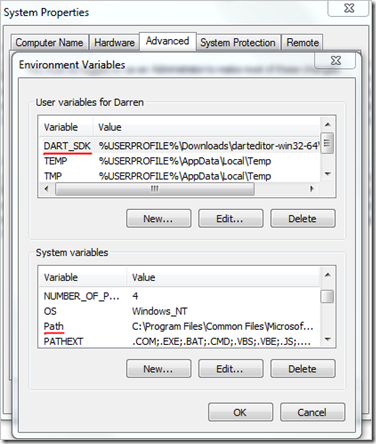
You’ll need to configure a couple of Windows environment variables which make it easier to work with the SDK tools.  First, add an environment called DART_SDK and point it at the root SDK folder in your unzipped Dart download.  Next, update your Windows System Path variable and add a path which points to the bin folder of the SDK folder:
image

The reason for pointing the Path variable at the bin folder is because that’s where the main tools that you will need to use are located.  The DART_SDK variable however needs to point at the root SDK folder because it is used to access SDK resources other than just the SDK bin tools alone – e.g. Libraries, Packages, and other Utilities.

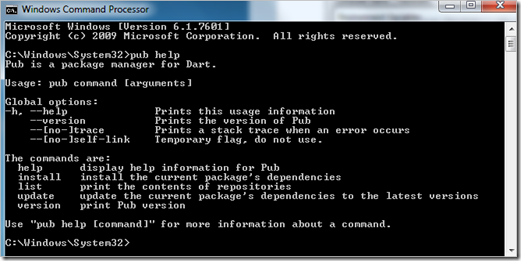
Test that you have configured your environment variables correctly by opening a Windows Command Prompt and type ‘pub help’ and you should see Help text for the Pub tool displayed:
image

Install Git

Many of the packages that you will want to include will require Git to pull them down.  Pub itself has support for working with Git via native protocol handlers which can be declared within the pubspec configuration files.  To get Git, download the latest stable build from the Git website.

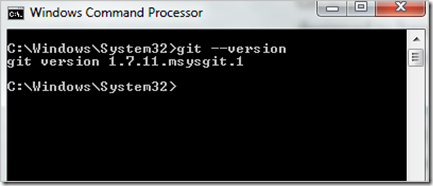
Test that you have Git correctly by opening a Windows Command Prompt and type ‘git –version’ and you should see the version number for your Git installation displayed:
image

Grab Dartsweeper from Git

Now that we have all of our tools installed, it’s simply a matter of using Git commands to fetch the Dartsweeper files and then we’ll use Pub to update all of its dependencies.

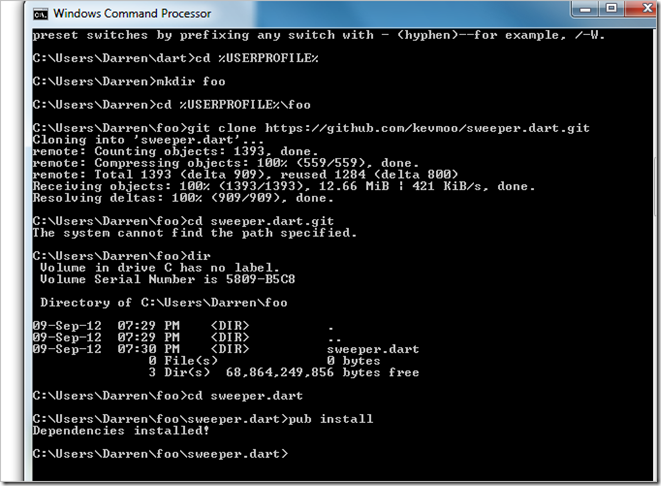
Open a Windows Command Prompt and change to a directory where you want to work from and type the following commands:

> mkdir %USERPROFILE%\dart
> cd %USERPROFILE%\dart
> git clone
https://github.com/kevmoo/sweeper.dart.git
> cd sweeper.dart
> pub install

This will make a folder under your user profile called Dart and then clone the contents of Dartsweeper repo on GitHub into it.  Finally we run the pub install command from within the newly downloaded Dartsweeper folder.

Here you can see the result of running those commands in real time:
image

Running Dartsweeper

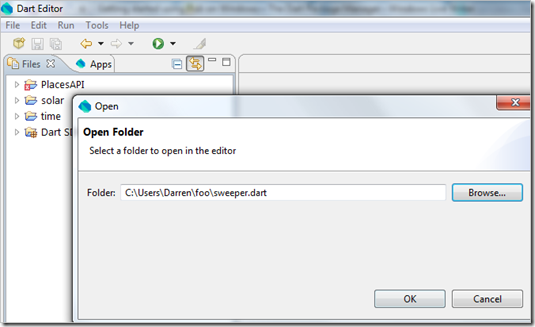
Now that we have Dartsweeper installed, it’s time to open it up in the Dart Editor and run it.  Open Dart Editor and open the sweeper.dart folder that we just grabbed from GitHub.
image

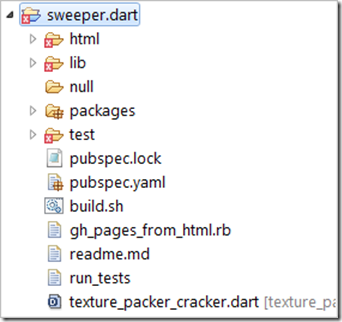
When you first open the application in Dart Editor, you will notice some red crosses against folders which indicate compiler errors:
image

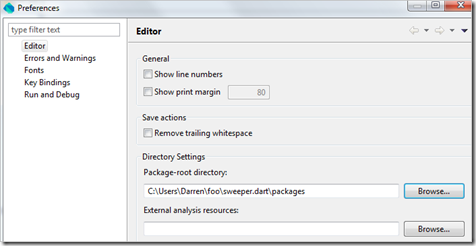
The reason for this is that, currently in the Dart Editor, we need set the location for the packages on a per application basis.  In this case, we simply need to open Tools|Preferences and change the location that we want the compiler to look in for packages for this application.
image

After doing that, you can right-click on the test folder and exclude it by choosing Don’t Analyze to remove it from the compilation analysis process.  That should remove the remaining compiler error warning.

Now press Ctrl+R (or hit the Run button) to run the application in the Dartium build of Chrome:

image

Friday, September 7, 2012

BingItOn

imageBingItOn.com is another wasteful exercise by the Microsoft Bing team which attempts to con users into believing that its results are superior to those of Google’s Search product. 

I remember travelling to Seattle 5 or 6 years ago and seeing this tool used internally at Redmond - now finally it appears that the mighty Redmond marketing machine has unleashed it upon the public at large.

The premise of this tool is that you run a search and two sets of results are returned - one from Bing and one from Google.  You are then asked to make a choice about which set of results is more useful.

There are two problems here.  First, Microsoft simply needs to turn its back on some of these old Ballmer fights and look instead to the future.  Get back to innovating and delighting customers and walk away from this sort of stuff.  They really don't need to fight meaningless fights just because Ballmer made some dumb promise all those years ago.

Second, how relevant is it to make a choice when you strip away the added value pieces that Google delivers to me in a normal search?  Things such as personalized search results and added context through their knowledge graph enhancements.   For example, when I run a search using the Microsoft BingItOn tool for AFL Football legend “Buddy Franklin”, I receive two walls of results:

image

Picking through them both to find a winner is tough and quite subjective.  But let’s see how the results actually appear when I do the search on the actual site’s:

First I use Google and we can see that the results which are presented are far more useful than what is simply presented in the BingItOn tool.  I’m given personalized results which are more engaging, presented better, and which have added context and knowledge about the topic.

image

Contrast that with a search on Bing.com and we can see Bing doesn’t actually make it much easier than the BingItOn tool:

image

Less engaging, less relevant, and potentially a lot more work to do on my behalf to get a result that I might be interested in.

Here I repeat the result by searching for the term “Adelaide Crows Players” and let’s look at the results:

Google presents me with a scrollable list of the current players with their playing positions at the head of the SERP.

image

With Bing on the other hand, it appears that the first half dozen results might even be advertisements:

image

Yet run it in the BingItOn tool and the results are far less clear:

image

So the message that I take away from the BingItOn tool is this... if we strip away all the stuff that makes Google search great and dumb it down to a certain level, which search engine do you prefer.  It's not even a valid question to ask!

Tuesday, August 21, 2012

Are our words really wasted?


Scott Hanselman told us that our words are wasted, and then went on to ask how his post was controversial?  Well...

  • He said that my words are wasted?
  • He told me that I'm not blogging enough?
  • He implied that Google and Facebook will SURELY fail?
So, perhaps there is a bit of controversy there :)

It's not like I don't agree with Scott on a number of points.  I've hosted my own blog in the past and even written my own blogging platform.  In terms of portability, I created BlogML to help allow people to move from service to service.  And regardless, controversy is not such a bad thing.  I just don't think that the article was his best piece of writing (I hold him to a much higher standard than I hold myself :)  One point I have trouble with in the post is the list of things that we apparently find ourselves asking over and over again:

AttributeG+FacebookLiveOther?
Is a free or cheap social network for the people?????
Let's me control my content?????
Allows export of everything ?????
Allows me to own what I type?????
Has an open API for my content?????
Allows search posts over a month old?????
Limits available usernames?????
Allows me to be 'verified'?????

Is that the full list of 'product attributes' or is it constantly changing.  And how do you find a single product which meets those needs while also staying current with constantly changing expanding list of product features that users need.  And what is the cost of meeting those needs with any single boxed product?

The current state of software services is such a moving target and I'm continually rethinking how I use my journal to link it with and help my daily activities.  That includes things such as being able to link activities by location, having content delivered to whatever device I'm on, sharing stuff easily through a variety of ways, embedding rich content such as maps and documents through to having a variety of different privacy and sharing options.

I feel like I'm trying stuff out to help improve my life's process flow.

So I tend to focus on the benefits of that I get from "renting" an existing service and not so much on the fact that some greedy NASDAQ listed company is making money from my effort.  Those benefits include:

  • I get a fancier "apartment" :)
  • There are often added perks over the choices I have otherwise
  • I get to share costs/overheads with multiple tenants
  • It is generally cheaper and easier to relocate
  • Boring maintenance work is often removed
  • For me, I believe that there are reduced risks

So, as with most things in life, there are choices and trade-offs.